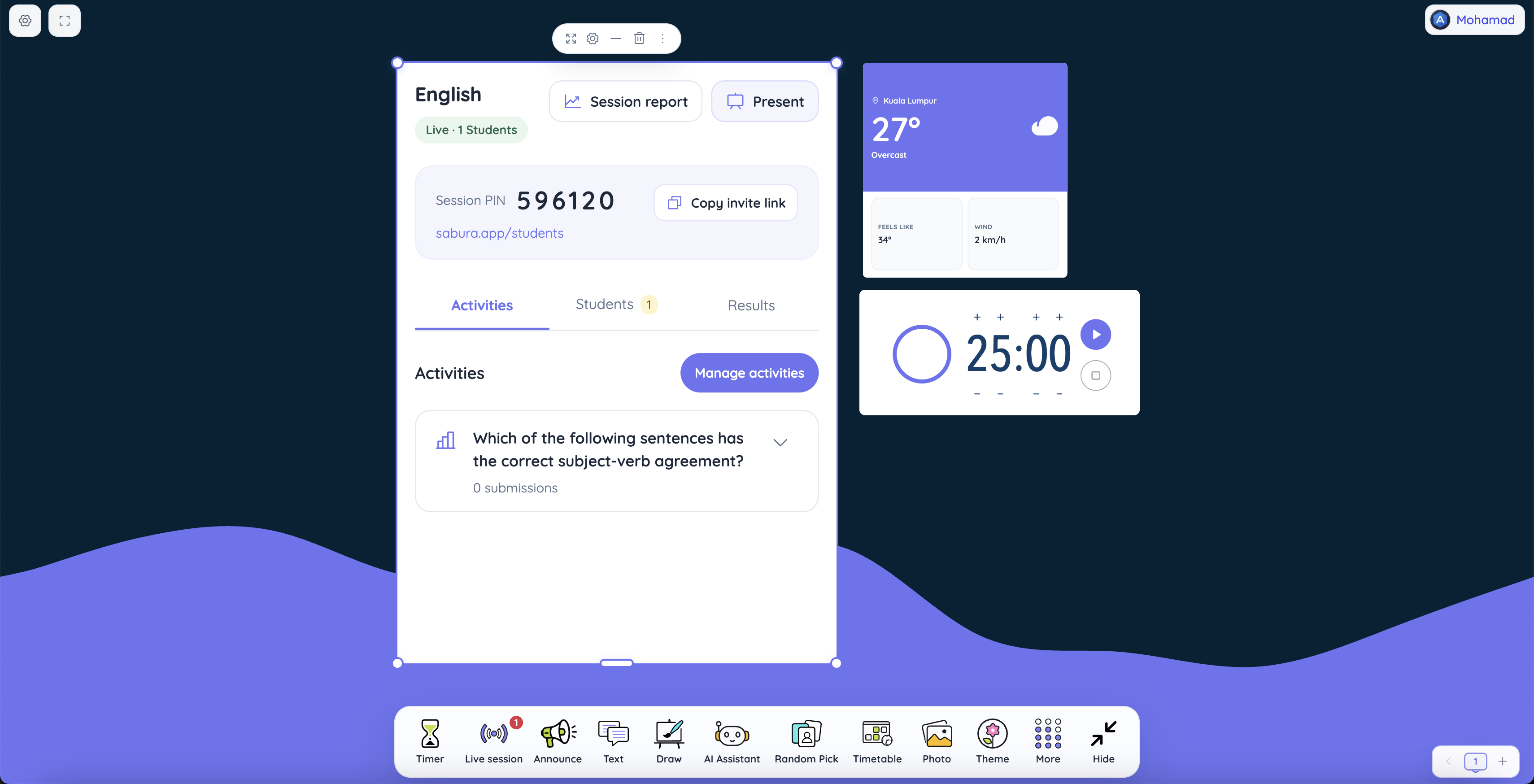
There is a particular kind of silence teachers know well. You've worked through a problem, explained the method twice, and asked whether anyone is confused. Nobody says a word. That might mean the class is ready. It might also mean the students who are unsure would rather stay quiet.
In a lesson on equivalent fractions, there is a more useful way to find out. Put a question to the whole class:
Which fraction is equivalent to 3/4?
- A. 3/8
- B. 6/8
- C. 4/6
- D. 6/12
Now every student has a chance to make a choice before the discussion begins. Suppose 18 choose B, six choose D, and four haven't responded. These are example numbers, but they tell a believable classroom story. Most students recognize the correct answer, some are multiplying in the wrong way, and the teacher needs to give the others a little more time.
That's the value of Sabura Live Sessions. It brings student responses into the lesson while they can still shape what happens next.
A simple start, even in a busy classroom
The teacher signs in to Sabura on a desktop or tablet and starts a live session. Students can enter through a QR code, an invitation link, or a PIN. They then type their name or select it from a class list.
The joining options matter more than they might appear. In one classroom, a projected QR code may be quickest. In another, the teacher may already have a way to share a link. If students need to enter a code, the PIN is there. Presentation mode can display the student URL, PIN, and QR code together, ready for the classroom screen.
Give students a moment to join before starting. In a live activity, a missing submission doesn't tell you anything about understanding until you know the student has had a fair opportunity to respond.
The revealing part isn't always the correct answer
Return to the fractions question. In Sabura, a vote is a multiple-choice question with a correct answer set by the teacher. The teacher can see live totals and individual responses as students submit. There are also lists of who has submitted and who hasn't, alongside participation information.
You could reveal that B, 6/8, is correct and move on. But the six votes for 6/12 are the interesting part. Ask students to compare the fractions using two rectangles shaded in equal parts. Why does doubling only one part of a fraction change its value? What happens when both the numerator and denominator are doubled?
If you need to stop for that explanation, the activity can be paused and resumed. You decide when the correct answer is revealed to students. New activities begin enabled, and only one activity runs at a time, so everyone is working on the same question rather than trying to follow several tasks.
This is also why a vote can be worth doing even when it takes only two minutes. The point isn't the number of clicks. It's the conversation you can have because you know where the misunderstanding sits.
When one question isn't enough
The class has discussed the model. Now you want to know whether the idea has settled, and whether students can explain it in their own words. That's a job for a named quiz, rather than another isolated vote.
You might call it “Fractions: Show What You Know” and include:
- Multiple choice: Which fraction is equivalent to 2/5? (A. 4/10, B. 4/5, C. 2/10)
- Multiple choice: Which fraction simplifies to 1/2? (A. 3/8, B. 4/8, C. 2/6)
- Written: Explain why 6/8 and 3/4 represent the same amount. Use a drawing or words.
- Written: A classmate says 2/6 equals 2/3 because both have a 2. How would you respond?
Sabura calculates percentage scores for the multiple-choice answers. Written answers are for the teacher to review; they are not graded automatically. That distinction is helpful. A student can select the right option without understanding why it works. Another may make a small mistake in a choice question but produce a thoughtful written explanation.
If you teach younger learners, keep the written prompt short. If you teach an older group, ask for a justification or a counterexample. The quiz gives you a place to collect both kinds of response without treating them as the same thing.
Give the conversation some room
Once students compare answers, questions start arriving. One student wants to know whether simplifying a fraction always means dividing. Another has a different diagram to show. A third is still thinking about the original question.
The optional Raise Hand feature helps keep those contributions in order. Sabura places requests according to who raised their hand first, and the teacher can mark each one answered after responding. It doesn't decide who should speak or what matters most; it simply makes the waiting list easier to manage.
Meanwhile, toolbar notifications draw attention to session activity and clear when handled. Together with the submitted/not-submitted lists, these give the teacher a practical view of what's happening without interrupting the lesson for a roll call after every question.
When it's time for a shared reflection, presentation mode can show the activity results. Rather than putting an individual student's mistake on display, look at the pattern: “Two answers were popular. What made one tempting, and what makes the other correct?”
The lesson is over. The responses are still useful.
After class, Sabura's history and reports include participant details, hand raises, votes, quiz answers, and scores. Report tables can be expanded or collapsed, and the data can be exported to CSV if you want to work with it elsewhere.
You might discover that nearly everyone chose the right equivalent fraction by the end of the lesson, yet many written explanations still say, “You multiply it,” without naming what is multiplied. That's a clear plan for tomorrow: ask students to complete the sentence “The fraction stays equivalent because…”, then test their explanation with a picture.
This is the important distinction: Sabura records the classroom responses. The teacher interprets them. A score can help you notice a pattern, but it doesn't replace your knowledge of the students or tell you automatically what to teach.
The practical details help, too. If the page is refreshed, an active session can be recovered. Sabura also remembers setup preferences, so familiar choices don't need to be made from scratch each time. Live Sessions supports English, Spanish, and Arabic, including a right-to-left layout for Arabic.
Try one good question tomorrow
You don't need a full quiz in every lesson. Start with one multiple-choice question that exposes a common misconception. Give everyone time to answer. Discuss the most revealing option before showing the correct answer. If you need a deeper check, add a short quiz with one written explanation. Afterwards, revisit the report while the lesson is still fresh in your mind.
Used this way, a live session isn't a performance of classroom technology. It's a way to hear more of what the class is thinking—and teach accordingly.
You can explore the broader classroom toolkit on the Sabura homepage.
Make room for every student’s answer
Open your classroom screen and start a live session with one thoughtful question.
Open the classroom screen