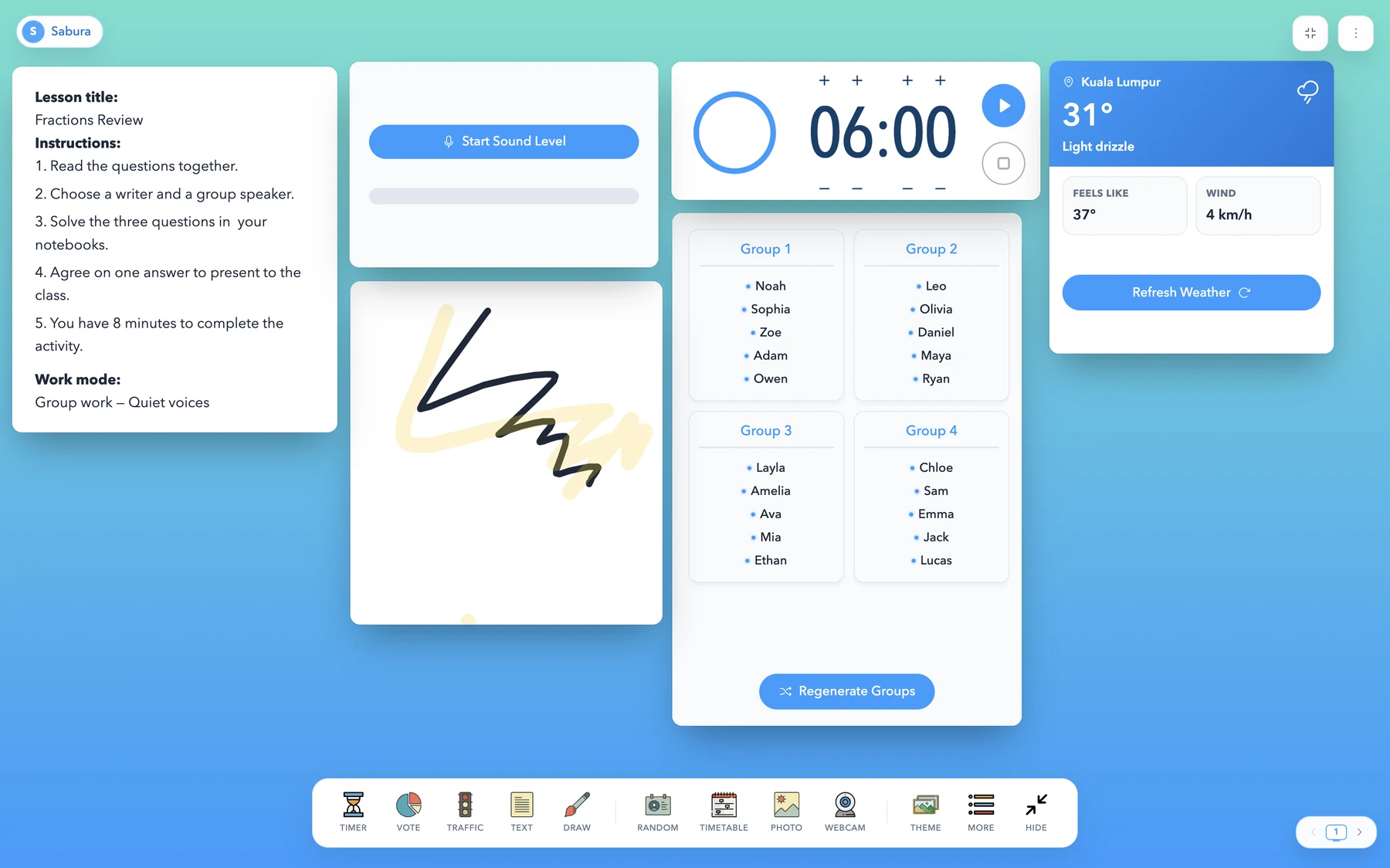
Classroomscreen is a popular way for teachers to display useful classroom tools on one screen.
Instead of opening separate websites for a timer, student groups, classroom instructions, voting, or a whiteboard, teachers can keep several tools visible during the lesson.
But some teachers may be looking for a different option.
You may want a free classroom dashboard, stronger Arabic support, a different interface, or another way to organize your classroom tools.
Sabura is a Classroomscreen alternative that brings classroom management and presentation tools together in one customizable dashboard.
Sabura is an independent product and is not affiliated with Classroomscreen.
Want all your classroom tools in one place?
Try Sabura for FreeWhat is Sabura?
Sabura is a browser-based classroom dashboard designed for teachers.
Every new account starts with a 7-day Pro trial without a credit card, including unlimited saved dashboards. After the trial, Free dashboards are temporary and are not saved after refresh or closing the page. Previously saved trial dashboards remain stored but locked until you upgrade to Pro. Existing Legacy Free accounts retain their original saved screen.
Free includes all classroom tools, all backgrounds, gradients and colors, 4 saved name lists, 2 saved images at up to 15 MB each, 1 saved PDF at up to 25 MB, and 3 AI prompts per month. Saved lists and account-library files remain available after refresh, but Free dashboard layouts do not. Pro adds unlimited saved dashboards and lists, live public screen sharing, unlimited images and PDFs, and 60 AI prompts per month.
You can open multiple tools, move them around the screen, resize them, and create a layout that fits your lesson.
Sabura can be displayed using:
- a classroom projector
- an interactive whiteboard
- a television
- a laptop
- a tablet
- screen sharing during an online lesson
The goal is simple: help teachers manage the lesson without switching constantly between different tabs and websites.
Why look for an alternative?
Different teachers need different workflows.
Classroomscreen may work well for many classrooms, but you may prefer an alternative if you want:
- a different interface
- support for Arabic and right-to-left layouts
- a free teacher dashboard
- another option for saving classroom layouts
- tools designed for both presentation and participation
- a simpler way to share information with students
Sabura is designed to provide those classroom tools inside one flexible screen.
What tools are available?
Sabura includes tools for managing time, presenting information, involving students, and organizing classroom activities.
Time and lesson organization
You can use tools such as:
- timer
- stopwatch
- clock
- visual schedule
- notes and instructions
For example, you can display the activity instructions beside a countdown timer so students always know what to do and how much time remains.
Seats
Create a seating grid from a saved list or entered names. Drag to move or swap students, lock seats, and shuffle the remaining students. Available on Free, along with every other classroom tool.
Student participation
Sabura can help teachers involve students using:
- random student picker
- group generator
- classroom voting
- scoreboard
- digital dice and random tools
These tools can be useful for questions, review games, group work, and classroom discussions.
Classroom management
Teachers can also use:
- classroom noise display
- traffic-light signals
- work-mode symbols
- visual reminders
These tools give students clear visual expectations without requiring the teacher to repeat the same instructions.
Presentation and teaching
Sabura also includes options for:
- text
- images
- PDF files
- video
- camera display
- QR codes
- digital whiteboard
- drawing and annotation
This allows the teacher to keep lesson content and classroom-management tools on the same screen.
Sabura compared with Classroomscreen
Both products are designed to help teachers manage classroom activities from one display.
| Feature | Sabura | Classroomscreen |
|---|---|---|
| Browser-based dashboard | Available | Available |
| Core classroom tools | Available on Free | All 26 widgets on Basic |
| Saved dashboards | Not saved on Free; unlimited on Pro | Pro only |
| Saved name lists | 4 on Free; unlimited on Pro | 3 on Basic; unlimited on Pro |
| Public link for sharing a screen | Pro only (live, view-only board) | Pro only |
| Full Arabic interface and RTL layout | Supported | Not available; selected classroom controls support 70+ languages, while the rest of the app is English |
Comparison reviewed on August 20, 2026. Features and plans may change. Check the official Classroomscreen pricing and language support pages, plus Sabura pricing, for current details.
The best option depends on your classroom, preferred language, interface, and the tools you use most often.
Classroomscreen may suit teachers who already know its interface and depend on its existing workflow.
Sabura may suit teachers who want an alternative, an Arabic-friendly experience, and a different way to arrange classroom tools.
Who is Sabura for?
Sabura may be useful for:
- primary school teachers
- secondary school teachers
- language teachers
- tutors
- online instructors
- teachers using interactive displays
- teachers working in Arabic and English
You do not need to use every tool.
A simple classroom screen might contain only:
- lesson instructions
- a timer
- a classroom noise indicator
- one participation tool
You can then add or remove tools as the lesson changes.
How to create your first screen
Start by opening Sabura in your browser.
Add a text window and write the main instructions for the activity.
Next, add a timer so students can see how much time they have.
Then choose one additional tool, such as:
- random student picker
- groups
- voting
- whiteboard
- noise display
Arrange the windows so the most important information is easy to read from the back of the classroom.
Avoid opening too many tools at once. A simple screen is usually more effective than a crowded one.
Is Sabura the right Classroomscreen alternative for you?
The easiest way to decide is to try it during a real lesson.
Open the tools you use most often and see whether the interface fits your teaching style.
Sabura may be a good option when you want:
- a free classroom screen
- an Arabic-friendly interface
- multiple teacher tools in one place
- a customizable classroom dashboard
- an alternative to switching between many websites
You can begin with a timer, instructions, and one interactive tool, then build your dashboard as needed.
Create your free classroom screen with Sabura.
Try Sabura for Free